
AI Knowledge Base
A knowledge base is what the AI knows when it answers: what your business does, your prices, the services you don’t provide, your FAQ, and files such as long price lists. One knowledge base can be used by several sources and by voice agents, so you keep your business facts in one place.
How the AI should answer (tone, greeting, sign-off, rules) doesn’t belong here: put that in Instructions for the AI on the AI Assistant settings. When the two disagree on a price or fact, the AI uses the knowledge base (which one wins).
Getting here
There are three places to work with knowledge bases:
- In Messaging Settings: go to Sources → select a source → Messaging Settings → Conversation Setup tab. For a whole business, open the sidebar’s Business switcher and click Messaging Settings next to the business. The Knowledge base section appears below What the AI should know once a channel is in AI Assistant mode.
- On the Knowledge bases page: go to Settings → Knowledge bases to see the knowledge bases of the business picked in the sidebar’s Business switcher (or of all your businesses), create one with Create knowledge base, and choose where each one is used. See Knowledge Bases.
- In a voice agent: open the agent → Knowledge base. See Voice agent knowledge base.
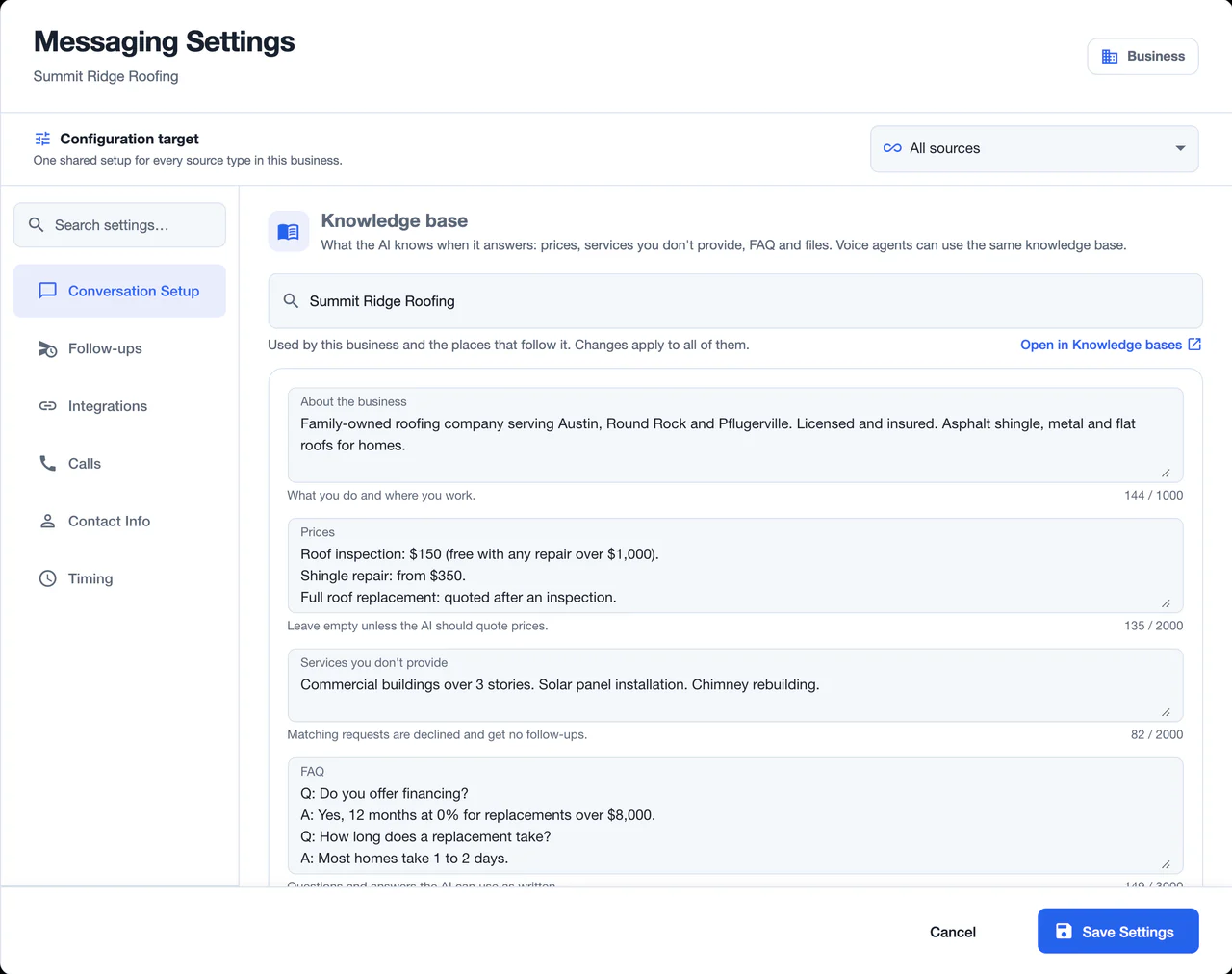
Choosing a knowledge base
In Messaging Settings, the Knowledge base picker shows what this source (or business) uses. The options are:
- What the place follows (listed first) - a source that hasn’t picked its own knowledge base follows its business; a business follows the business above it, for the same source type (a top-level business has nothing above it to follow). The option shows the followed knowledge base’s name and where it comes from, for example from the business.
- A knowledge base by name - use that knowledge base here. You can pick those of this business and of the businesses above it. A knowledge base that belongs to another business shows that business’s name.
- No knowledge base - the AI answers without prices, FAQ or files.
- New knowledge base - create a new one for this place when you save.
A place uses one knowledge base at a time. The line under the picker says who else uses the knowledge base shown, because a change to its fields or files applies to every place that uses it. Open in Knowledge bases opens it on the Knowledge bases page in a new tab.
On a business, picking a knowledge base also switches the sources and voice agents that follow the business.
Edits to the fields, and a change of knowledge base, take effect when you click Save Settings.
Business settings and source types
In a business’s Messaging Settings, the choice applies to the business’s sources unless a source picks its own knowledge base:
- All sources - one choice for every source type of the business. If its source types use different knowledge bases, the section says so and shows one of them; picking one here uses it for all source types.
- A single source type (for example Yelp) - the choice applies to the business’s sources of that type.
The fields
The AI reads these fields every time it answers.
| Field | Limit | What to put in it |
|---|---|---|
| About the business | 1,000 characters | What you do and where you work. |
| Prices | 2,000 characters | Prices the AI may quote. Leave empty unless the AI should quote prices. |
| Services you don’t provide | 2,000 characters | Requests that match are declined and get no follow-ups. |
| FAQ | 3,000 characters | Questions and answers the AI can use as written. |
Files
- What files are for: long price lists and service catalogs. Put everything else (what you do, short prices, services you don’t provide, FAQ) in the fields: the AI always reads the fields, while files are only searched when the fields don’t have the answer. Don’t upload instructions for the AI.
- File types: PDF, Word (.docx), Excel (.xlsx, .xls), CSV or text (.txt), up to 3 MB each. Old .doc files aren’t accepted.
- Actions: Upload file (the file is added right away, without waiting for Save Settings), download, delete.
- Status icons: each file shows whether it is used in chats and in calls (yes, getting ready, not yet, or couldn’t be read). A file marked Couldn’t be read isn’t used.
- Suggested fields: after you upload a file, the AI reads it and shows Suggested from the file name, with text for the fields the file adds to. Tick the fields you want and click Apply to fields, then save. Nothing changes until you apply and save. Text that looks like instructions for the AI is listed separately, so you can move it to your Instructions for the AI or a voice agent’s Custom Rules. The suggestion also says whether the file is worth keeping after the fields are filled.
The Knowledge bases page
Open Settings → Knowledge bases and click a knowledge base to open it, or click Create knowledge base.
- Name - up to 100 characters.
- Belongs to - chosen when you create it. This business and the businesses under it can use it, and admins and managers of this business (or of a business above it) can change it. For anyone else it opens read-only, marked Managed by its business.
- What the AI knows - the same fields and files as above.
- Where it’s used - the businesses, source types, sources and voice agents that use it. Places that follow one of these use it too. Click Use in… to choose more places (they stop using what they use now), or Stop using next to a place to remove it.
- Delete - deletes the knowledge base.
How it behaves
- AI Assistant only for chats: in Predefined Messages mode there is no AI, so the knowledge base isn’t used for chat replies.
- Shared by channels: the primary channel and SMS use the same knowledge base.
- Shared with voice agents: a voice agent can use the same knowledge base, so chats and calls give the same facts.
- Changes apply everywhere it is used: every place that uses the knowledge base gets the same fields and files.
- Locked while inherited: while Customize for … is off on Conversation Setup, the knowledge base section is read-only: it shows the knowledge base this place uses, and you can’t change it there.
Keep the fields short and specific. Use one clean price-list file rather than one giant PDF containing everything.
Troubleshooting
- The AI isn’t using information from my file: check the file’s status icon for chats. Scanned images inside a PDF have no text to read. If the fact is short, put it in a field instead: fields are always read, files only searched.
- The AI quotes a price I didn’t give it: check Prices and the files, and remove prices from Instructions for the AI.
- I can’t edit the knowledge base: the line under the picker says why. “Managed by …”: it belongs to another business, and only admins and managers of that business (or of a business above it) can change it; you can still pick another one. “Only an admin or manager of … can change the knowledge base here.”: you aren’t an admin or manager of this place’s business. Or Customize for … is off on Conversation Setup.
- A text change reached other sources: they use the same knowledge base. To give this source its own content, pick New knowledge base and save.
- File upload fails: use a supported type (.pdf, .docx, .xlsx, .xls, .csv, .txt) of 3 MB or less. An upload is also refused when the file has no text that can be read (for example a scanned PDF), has more text than one file can hold, or has the same name as a file already in this knowledge base.
Questions? Email support@nzleads.com.