
AI Assistant
Enable your yelp AI assistant to handle conversations with each customer — from a single personalized welcome message to a full multi-message exchange. The AI reads what the customer wrote and responds in a way that addresses their specific request.
Intelligent Personalization: Unlike keyword matching, AI reads and understands each customer’s message to create truly personalized responses that feel human-authored.
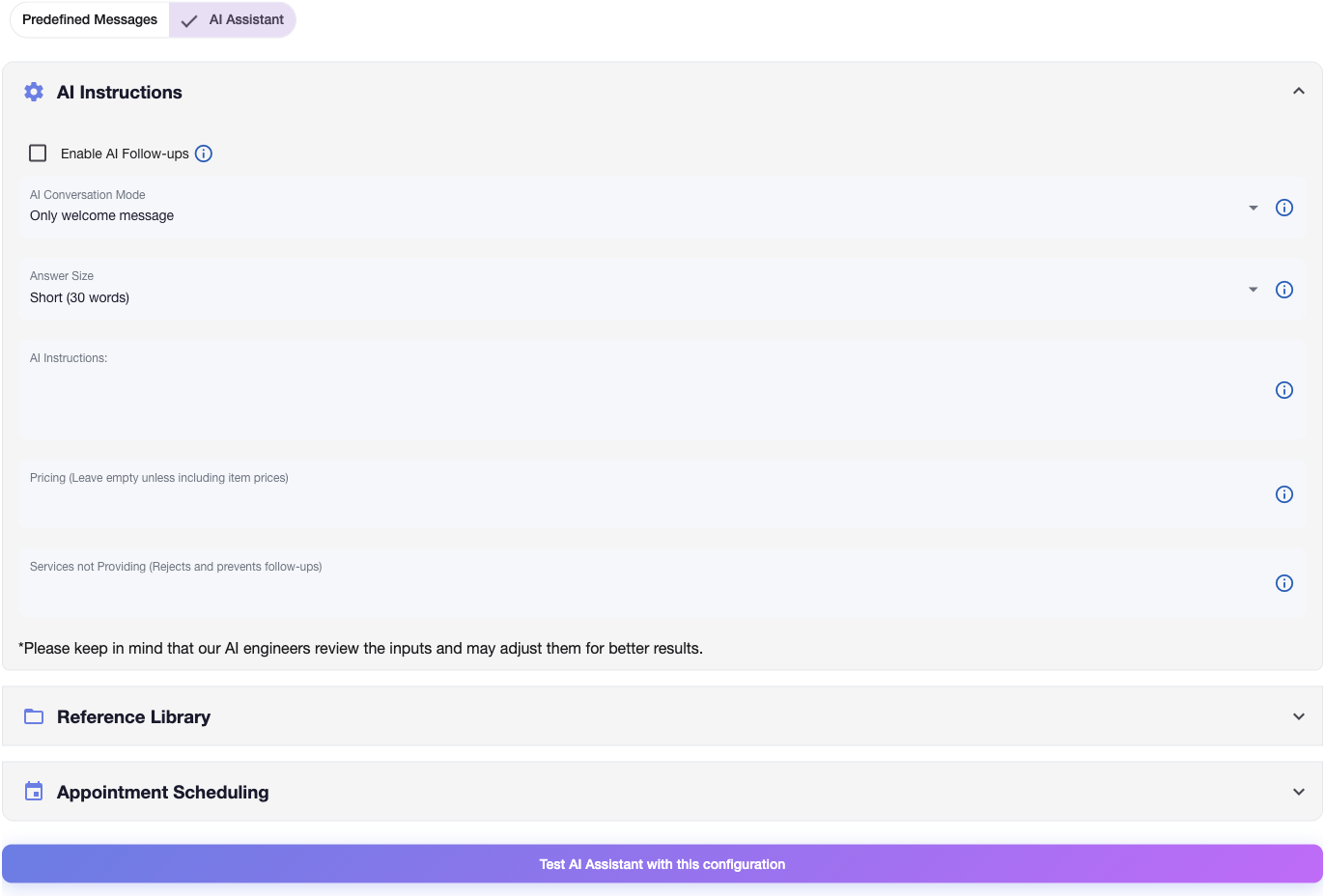
How AI Assistant Works
The AI does two things:
- Reads the inquiry - Understands what the customer is asking, how urgent it is, and what they need
- Writes a response - Creates a message tailored to that specific request, using your business info, in your tone
Every message is unique to the customer. The AI keeps your tone consistent and includes the right details (pricing, next steps, contact info).
Configuration Settings
AI Conversation Mode
Control how many messages the AI sends to each lead:
- Only welcome message: AI sends one welcome message, then stops — the follow-up sequence begins.
- Short conversation: AI continues the conversation for up to 5 AI messages to answer questions and qualify the lead.
- Long conversation: AI handles up to 10 AI messages for in-depth discussions.
Knowledge Base
Upload documents to give the AI context about your business.
- Supported files: .pdf, .doc, .docx, .txt, .csv, .xls, .xlsx (Max 1MB)
- Usage: AI reads these documents to answer specific questions about services, pricing, or company policies.
Appointment Scheduling
Enable AI to automatically book appointments directly from conversations.
- Calendar integration: Cal.com, FieldPulse, GoHighLevel or HouseCallPro
- Real-time availability: Checks your calendar live during conversation
- Confirms details: Reads back appointment time and service
- Full management: Check, book, cancel, or reschedule appointments
Response Length
- Short (30 words) - Quick and to the point
- Long (50 words) - Standard length with some detail
- Detailed (80 words) - Longer responses with more information
Business Instructions
Tell the AI about your business so it can write accurate responses:
Essential Information:
- Business services and specializations
- Years of experience and credentials
- Pricing structure and minimum project fees
- Service area and availability
- Contact information and next steps
Example Configuration:
Construction company with 20 years experience using premium materials.
Minimum project fee: $500. Begin messages with 'Hello [name]' and end with
'Best regards, Construction Team, (213) 111-1111.'
Service Exclusions (Optional)
Define services to decline or redirect for automatic lead qualification:
This lets you:
- Automatically filter out unqualified prospects
- Focus your time on profitable projects
- Set expectations upfront
Example Exclusions:
We decline projects under $500 including minor repairs (small tile fixes,
faucet repairs, drywall patches). For smaller needs, recommend local handyman services.
Pricing Information (Optional)
Include specific pricing when comfortable sharing immediately:
Sharing pricing early helps:
- Show your value right away
- Filter out prospects outside your price range
- Build trust with upfront transparency
Example Pricing:
Window Installation: $200 per window
Complete Renovations: Starting at $50 per square foot
Roof Installation: $4-20 per square foot (material dependent)
Yelp Business Automation AI Features
How the AI Personalizes
- Uses the prospect’s name automatically
- Tailors content to the specific service requested
- Adjusts tone for emergencies vs. standard requests
- Factors in location and timing
Quality Controls
- Our AI team reviews and optimizes configurations
- The system improves over time based on performance
- Built-in safeguards prevent off-brand or inappropriate responses
AI Follow-ups
AI Follow-ups is an optional feature that lets the AI send its own follow-up messages when a lead goes silent mid-conversation. Unlike predefined follow-ups, these messages are generated by the AI on the fly — the AI writes the content and determines the timing based on the conversation context.
How It Works
When a lead has replied to the AI and then goes silent, the AI evaluates whether the conversation is resolved. If not, it sends a follow-up to re-engage — written in your tone, referencing the actual conversation.
Requirements for AI Follow-ups to activate:
- AI Conversation Mode must be Short conversation or Long conversation (the AI must still be active)
- AI Follow-ups must be enabled in your settings
- The lead must have replied to the AI at least once
Not available in “Only welcome message” mode. Once the welcome message is sent in this mode, the AI conversation ends and your predefined follow-up sequence takes over instead.
Behavior
- AI-generated content — The AI writes each follow-up based on the conversation, not a fixed template
- AI-determined timing — The AI decides how long to wait before following up
- Limited count — By default, the AI sends 1 follow-up per conversation (configurable)
- Manual override — If you reply personally, the AI conversation and all AI follow-ups stop immediately
Testing and Optimization
Pre-Launch Testing
Test Scenarios:
- Pricing inquiries for different services
- Emergency and urgent requests
- General project information requests
- Services outside your scope
Validation Steps:
- Use “Test AI Assistant” feature for various inquiry types
- Review response quality for tone and information accuracy
- Verify business information included correctly
- Confirm service exclusions work as intended
Performance Monitoring
Key Metrics:
- Customer response rates to AI messages
- Phone number collection success
- Lead qualification accuracy
- Conversion rates vs. predefined messages
AI Assistant Best Practices
Getting Better Results
- Be specific in your instructions — detailed info produces better responses
- Include examples of how you like to communicate
- Update your settings as you learn what works
- Always test before going live
What to Include
- Your actual business tone (not corporate-speak)
- What makes your business different
- Clear next steps for the customer
- Your direct contact info
Getting Started
- Configure AI assistant settings - Set up business information and parameters
- Test with various scenarios - Validate response quality
- Enable AI welcome messages - Activate personalized responses
- Monitor and optimize - Track performance and refine settings
Your yelp automatic follow-ups system with AI assistant handles personalized responses so you can focus on the leads that are ready to buy.
Questions about AI assistant configuration? Email support@nzleads.com or use in-app chat for setup guidance.