
Conversation Setup
Your welcome message is the first thing every potential customer sees. Configure how your Yelp and Thumbtack Auto Responder handles every new inquiry — from a single welcome message to a full AI-handled conversation followed by automated follow-up sequences.
Global vs Source-Specific: Use consistent conversation settings across all sources, or customize settings for different platforms (Yelp vs Thumbtack) or service types.
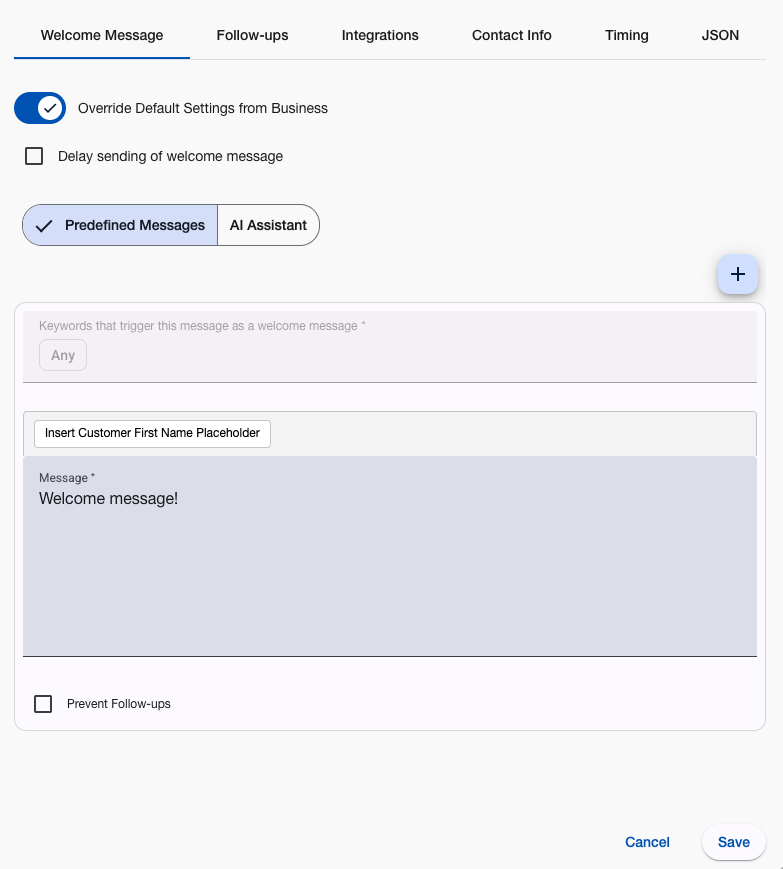
How Conversation Setup Works
Customer Contact Process:
- System receives inquiry from connected platform
- Message analysis - Checks keywords, urgency, pricing requests
- Welcome message triggers - AI generates a personalized response or predefined message matches
- Automatic delivery - Respects timing and business hours settings
- AI conversation continues (if Short/Long conversation mode) — AI replies to each customer message until its message limit is reached or the customer stops responding
- Follow-up sequence begins - Unless configured to prevent follow-ups
Smart Features:
- Name personalization - Automatically includes customer’s name
- Context awareness - Different responses for different inquiry types
- Timing control - Send immediately or delay for natural timing
- Business hours integration - Hold messages until appropriate times
Conversation Types
AI Assistant →
Best for: Personalized responses to every unique inquiry
Yelp AI assistant reads each customer message and creates custom responses based on your business instructions. Every response addresses the customer’s specific request.
Key Benefits:
- Personalized responses - Addresses each customer’s specific request
- Context understanding - Pricing questions get pricing info, emergencies get urgent responses
- Brand consistency - Follows your business description and communication style
- Complexity handling - Discusses project details and answers specific questions (Short/Long conversation modes)
- Knowledge Base - Uses uploaded documents to answer detailed inquiries
Setup Requirements:
- Business and services description
- Pricing information (starting rates, minimum fees)
- Services you don’t provide
- Response length preference
Predefined Messages →
Best for: Complete control over customer responses
Create specific messages triggered by keywords in customer inquiries. Ideal for businesses with common question patterns or compliance requirements.
Key Benefits:
- Total control - You write exactly what customers see
- Keyword targeting - Different responses for “emergency”, “price”, “quote”
- Fallback system - Default message for non-matching inquiries
- Quick setup - Write once, use automatically
Setup Process:
- Create keyword-triggered messages for common inquiries
- Write default message for everything else
- Arrange messages by priority order
- Test with typical customer phrases
Message Timing Options
Delay Settings →
Control when welcome messages are sent for more natural, human-like timing.
Instant Response (Default)
- Immediate message delivery
- Best for emergency services or time-sensitive businesses
- Maximum responsiveness demonstration
Delayed Response (1-30 minutes)
- Natural delay for human-like timing
- Reduces automation appearance
- Suitable for professional services or non-urgent inquiries
Business Hours Only
- Holds messages until operating hours
- Respects customer time and expectations
- Prevents off-hours messaging
Advanced Features
Personalization Variables
Include customer’s name automatically: #customer_display_name#
Follow-up Control
Configure whether yelp automatic follow-ups should continue after the welcome message.
Message Testing
Test your conversation flow with sample customer inquiries before going live.
Analytics Integration
Track conversation performance through analytics dashboard.
Configuration Best Practices
Message Content:
- Professional tone - Match your business communication style
- Clear information - Include relevant business details and next steps
- Call to action - Guide customers toward desired response
- Contact information - Provide easy ways for customers to reach you
Timing Strategy:
- Emergency services - Use instant responses
- Professional services - Consider 1-5 minute delays
- Retail/ecommerce - Respect business hours
- 24/7 services - Allow any-time responses
Platform Customization:
- Yelp responses - Professional and informative
- Thumbtack responses - Project-focused and detailed
- Emergency keywords - Override timing restrictions
- Pricing inquiries - Include relevant cost information
Common Setup Scenarios
Service Business Setup
- AI assistant for personalized project discussions
- Emergency keywords for urgent responses
- Business hours timing for non-emergency inquiries
Professional Services
- Predefined messages for common consultation requests
- Delayed responses for natural timing
- Detailed service descriptions and credentials
Emergency Services
- Instant responses with emergency contact information
- Keyword triggers for urgent situations
- 24/7 availability messaging
Getting Started
- Choose your message type - AI assistant or predefined messages
- Configure timing - Instant, delayed, or business hours only
- Test your setup - Send sample inquiries to verify response behavior
- Monitor performance - Use analytics to track engagement and response rates
Your yelp chatbot conversation flow sets the tone for every customer interaction. Pick the approach that fits your business.
Questions about conversation setup? Email support@nzleads.com or use in-app chat for guidance.