
AI lead qualification and routing for service businesses

AI lead qualification reads every incoming lead, qualifies it against the services, price ranges and service area you give it, and routes it instantly: emergencies get an instant callback, ready-to-book leads get availability and a booking link, price shoppers get a range and follow-up, and spam or out-of-area requests get a polite decline. You only spend your time on real jobs.
This is part of our complete Lead Response Automation guide for service businesses.
Say you get 40 leads a week and only some of them are real jobs. The rest are spam, price shoppers, or out-of-area requests. Without AI qualification, you spend equal time on all 40. The real ones wait in line behind the junk.
Stop wasting hours on dead-end leads. Try NZ Leads free and let AI qualify and route your leads before they hit your phone.
How does AI lead qualification work?
AI reads each incoming lead, qualifies it from what the customer wrote or said, then routes it automatically. No human touches a lead until it’s qualified.
| Step | What happens | Time |
|---|---|---|
| Lead arrives | Yelp, Thumbtack, Google LSA, Facebook, Instagram, or phone call | 0 sec |
| AI reads context | Parses service needed, location, urgency signals, time of day | Instant |
| AI qualifies | Checks the request against your services, price ranges and service area | Instant |
| AI routes | Triggers callback, offers booking link, starts follow-up, or archives | Instant |
Leads are qualified and acted on instantly. By contrast, in an audit of 2,241 U.S. companies, the average response time was 42 hours (Harvard Business Review, 2011).
What are the lead qualification categories?
Four buckets. Each gets different treatment.
- Emergency / same-day. “Water is flooding my basement.” AI triggers an instant callback or live transfer. These are the leads where speed matters most.
- High-intent / ready to book. “Can you inspect our roof next week?” AI’s reply offers availability and a booking link while the customer is still ready to book.
- Price shoppers / early stage. “How much does a mini split cost?” AI’s reply gives a helpful range and offers an on-site estimate. Automated follow-up runs at day 2 and day 5.
- Out-of-scope or spam. Wrong area, wrong service, not a real inquiry. AI creates a polite decline and skips your notification.
You only hear about leads worth your time.
How can I qualify leads before I call them back?
Give the AI your services, price ranges and service area: it writes the first reply from them and qualifies the enquiry in the conversation, so when you add prices and let it quote them, a homeowner sees your range before you pick up the phone. Put your area and drive-time rules in its scheduling instructions and connect your CRM, so you call back the leads that fit.
The usual advice is an intake form that asks for a ZIP code and a budget band first. A homeowner who writes to you on Yelp, Thumbtack or Google Local Services never sees your form, so the qualifying has to happen in the reply. Three settings do it:
- Write down what you do, where, and for how much. In the knowledge base, describe your work and the towns or ZIP codes you cover, give each service the range or starting price you quote, and list the services you don’t provide: a matching request is declined and gets no follow-ups. In the Instructions for the AI, list what to ask before booking (address, scope, timing) and tell it to quote your range, so a homeowner with a much smaller job sees your prices in the reply. Pick a Short or Long conversation so it can ask; with “Only welcome message” it stops after the first reply.
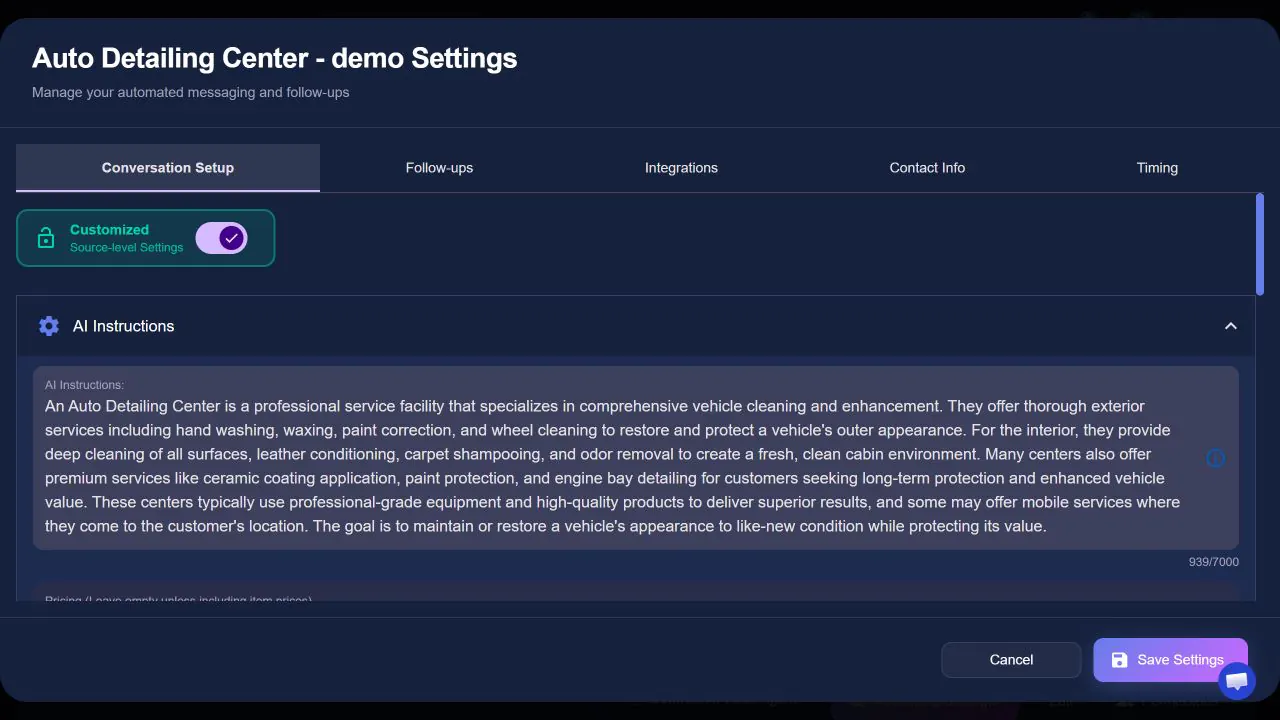
- Put your area into the booking rules. Write service-area, geographic and travel-time rules into its scheduling instructions in plain words, such as “book only in these ZIP codes” or “no new jobs across the river on Mondays”. When job addresses are available, the AI can compare them and estimate the drive between jobs before it offers a time. That drive time is an estimate, not a live traffic reading.
- Let the lead land in your CRM, then call in order. Leads are created or updated in the CRM you connect, such as HubSpot, GoHighLevel, Pipedrive or ServiceTitan. Where your connector offers “Create lead in CRM only when contact info is received”, turn it on to keep leads that never left a phone number or email out of your pipeline. Call the booked and best-fit leads first.
Does lead routing actually save time?
Yes. Qualification on its own changes nothing until the lead goes somewhere. Routing is what saves hours and closes jobs.
For a service business with 2-3 techs, routing looks like this:
- Emergency leads go straight to the on-call tech’s phone via voice AI or live transfer
- Booking-ready leads land in your CRM with details pre-filled. Office manager just confirms.
- Follow-up leads enter an automated 7-day sequence. No one touches it.
- Out-of-scope leads get archived with a reason for later review
NZ Leads creates or updates the customer record in a connected CRM: HubSpot, Salesforce, Pipedrive, Monday.com, GoHighLevel and Quickbase, or the field service platforms ServiceTitan, Housecall Pro, Workiz, AccuLynx and SmartMoving. Another CRM can take leads through Zapier or a REST Webhook. No copy-pasting. No manual data entry.
What ROI does AI lead qualification deliver?
The return shows up in where your time goes. Here is what changes:
| Metric | Before AI | After AI |
|---|---|---|
| Response time (high-priority) | Often hours | Instant |
| Junk leads reaching you | All of them | Filtered out by your rules |
| Follow-up completion | Depends on who remembers | Every lead that goes quiet gets the configured follow-up |
| Time on dead leads | Manual sorting every week | Out-of-scope leads handled automatically |
If you pay per lead on Google LSA or Facebook, every junk lead costs you twice: once for the lead and again for the time you spend sorting it. Plug in your own lead cost, junk rate, and time per lead to see what qualification is worth to you.
How does qualification work across different platforms?
One qualification engine handles every source. The delivery method adapts to the platform.
- Yelp and Thumbtack: Qualified via text conversation
- Google LSA and Facebook: Triggers an outbound AI call instantly
- Inbound calls: Handled live by the voice agent
Same rules everywhere. No separate workflows per channel. One setup, every platform covered. For the chat side of it, see how an AI chatbot for leads replies, qualifies and books inside the conversation.
Try AI lead qualification on your real leads
Setup takes under 2 minutes, and you can be live the same day. You set your services, service area, hours, and routing rules. AI handles everything else.
Try NZ Leads free and run a test with your actual lead flow. See how many hours you get back in the first week.